SQL Server tracks every time the query optimizer identifies a missing index that could have reduced the cost of a query. That information accumulates in the missing index DMVs, and querying them is the first step toward better performance. But blindly creating every index the DMVs suggest is a mistake that can cost you more performance than it gains. In this post, I’ll show you how to query those DMVs and how to properly analyze each recommendation before taking action. Let’s dig in.
What are missing indexes and which DMVs track them?
Missing indexes are recommendations generated by the optimizer whenever it determines an index could have lowered a query’s execution cost. SQL Server doesn’t create them automatically — it records them in these DMVs for you to evaluate:
| DMV | What It Contains |
|---|---|
sys.dm_db_missing_index_details | Index detail: table, equality, inequality, and INCLUDE columns |
sys.dm_db_missing_index_groups | Relationship between groups and details (bridge table) |
sys.dm_db_missing_index_group_stats | Usage stats: seeks, scans, average cost, estimated impact |
sys.dm_db_missing_index_group_stats_query | (SQL Server 2019+) Links each recommendation to the query that triggered it |
equality_columns are columns used in equality predicates (WHERE col = value) and inequality_columns are those in range predicates (>, <, BETWEEN). When creating the index, equality columns go first in the key, followed by inequality columns — this order allows an efficient seek operation.
Script to get missing indexes with estimated impact
This script joins the three main DMVs and sorts by improvement_measure — a calculation that combines cost, impact, and frequency of use.
SELECT TOP 50
    GETDATE() AS query_date,
    DB_NAME(mid.database_id) AS database_name,
    mid.statement AS table_name,
    CONVERT(DECIMAL(28,1),
        migs.avg_total_user_cost
        * migs.avg_user_impact
        * (migs.user_seeks + migs.user_scans)
    ) AS improvement_measure,
    migs.avg_user_impact AS estimated_impact_pct,
    migs.user_seeks,
    migs.user_scans,
    mid.equality_columns,
    mid.inequality_columns,
    mid.included_columns,
    'CREATE NONCLUSTERED INDEX [IX_'
        + REPLACE(REPLACE(REPLACE(mid.statement, '[', ''), ']', ''), '.', '_')
        + '_' + CONVERT(VARCHAR, mid.index_handle) + '] ON '
        + mid.statement + ' ('
        + ISNULL(mid.equality_columns, '')
        + CASE
            WHEN mid.equality_columns IS NOT NULL
                 AND mid.inequality_columns IS NOT NULL THEN ', '
            ELSE ''
          END
        + ISNULL(mid.inequality_columns, '')
        + ')'
        + ISNULL(' INCLUDE (' + mid.included_columns + ')', '')
    AS create_index_script
FROM sys.dm_db_missing_index_groups AS mig
    INNER JOIN sys.dm_db_missing_index_group_stats AS migs
        ON migs.group_handle = mig.index_group_handle
    INNER JOIN sys.dm_db_missing_index_details AS mid
        ON mig.index_handle = mid.index_handle
WHERE mid.database_id = DB_ID()
ORDER BY improvement_measure DESC;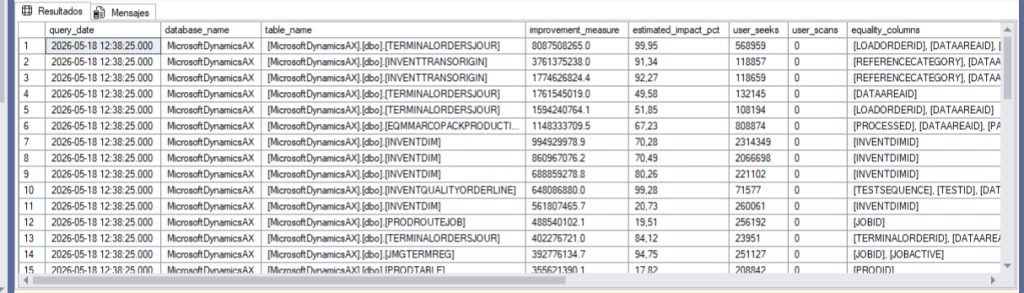
But hold on — don’t just copy and paste those create scripts. Each one needs to be analyzed first.
Script to get the query that triggered the recommendation (SQL Server 2019+)
Starting with SQL Server 2019, you can find out exactly which query generated each recommendation. Without this context, you’re flying blind: is this a query that runs thousands of times a day, or something someone fired off once?
SELECT TOP 30
    mid.statement AS table_name,
    CONVERT(DECIMAL(28,1),
        migs.avg_total_user_cost
        * migs.avg_user_impact
        * (migs.user_seeks + migs.user_scans)
    ) AS improvement_measure,
    migs.avg_user_impact AS impact_pct,
    mid.equality_columns,
    mid.inequality_columns,
    mid.included_columns,
    st.text AS originating_query
FROM sys.dm_db_missing_index_group_stats_query AS migsq
    INNER JOIN sys.dm_db_missing_index_group_stats AS migs
        ON migsq.group_handle = migs.group_handle
    INNER JOIN sys.dm_db_missing_index_groups AS mig
        ON migs.group_handle = mig.index_group_handle
    INNER JOIN sys.dm_db_missing_index_details AS mid
        ON mig.index_handle = mid.index_handle
    CROSS APPLY sys.dm_exec_sql_text(migsq.last_sql_handle) AS st
WHERE mid.database_id = DB_ID()
ORDER BY improvement_measure DESC;
Why you shouldn’t create every index SQL Server recommends
The DMVs are a diagnostic tool, not an automatic action plan. There are several reasons to analyze each recommendation individually:
The index might be a full or partial duplicate. SQL Server doesn’t compare recommendations against your existing indexes. It can suggest (ColA, ColB) when you already have (ColA, ColB, ColC) that covers the query. The same applies to overlaps: a recommended index on (ColA, ColB) INCLUDE (ColC) might already be covered by (ColA, ColB) INCLUDE (ColC, ColD). Create it without checking, and you’ll have a redundant index that wastes space and penalizes every write.
The table might be over-indexed. Every nonclustered index has a maintenance cost on INSERTs, UPDATEs, and DELETEs. I’ve seen tables with 25 indexes where writes took three times longer than they should. Once you exceed 8-10 nonclustered indexes, check sys.dm_db_index_usage_stats — look for indexes with zero seeks and scans but high update counts.
The column order might not be optimal. The DMVs order columns based on how they appeared in the query, not by selectivity. Review the value distribution for each column to determine the right key order.
You lose everything on restart. All missing index data is lost when SQL Server restarts. It’s not persisted to disk. Check how long your server has been up before making decisions:
SELECT sqlserver_start_time FROM sys.dm_os_sys_info;
Checking for duplicates and generating the right create script
Before creating any index, compare it against what already exists on that table:
DECLARE @schema_name SYSNAME = 'dbo';
DECLARE @table_name SYSNAME = 'YourTable';

SELECT
    i.name AS index_name,
    i.type_desc AS index_type,
    STRING_AGG(
        CASE WHEN ic.is_included_column = 0
             THEN c.name + CASE WHEN ic.is_descending_key = 1 THEN ' DESC' ELSE ' ASC' END
        END, ', '
    ) WITHIN GROUP (ORDER BY ic.key_ordinal) AS key_columns,
    STRING_AGG(
        CASE WHEN ic.is_included_column = 1 THEN c.name END, ', '
    ) AS include_columns
FROM sys.indexes AS i
    INNER JOIN sys.index_columns AS ic
        ON i.object_id = ic.object_id AND i.index_id = ic.index_id
    INNER JOIN sys.columns AS c
        ON ic.object_id = c.object_id AND ic.column_id = c.column_id
WHERE i.object_id = OBJECT_ID(@schema_name + '.' + @table_name)
    AND i.type IN (1, 2)
GROUP BY i.name, i.type_desc;
Once you’ve decided an index is worth creating, remember that ONLINE = ON is only available on Enterprise Edition (and Azure SQL Database / Managed Instance). On Standard Edition, the table is locked for the entire operation.
-- Enterprise Edition / Azure SQL
CREATE NONCLUSTERED INDEX [IX_Orders_CustomerId_OrderDate]
ON [dbo].[Orders] ([CustomerId], [OrderDate])
INCLUDE ([Total], [Status])
WITH (ONLINE = ON, SORT_IN_TEMPDB = ON, MAXDOP = 4);
GO

-- Standard Edition
CREATE NONCLUSTERED INDEX [IX_Orders_CustomerId_OrderDate]
ON [dbo].[Orders] ([CustomerId], [OrderDate])
INCLUDE ([Total], [Status])
WITH (SORT_IN_TEMPDB = ON, MAXDOP = 4);
GO
Not sure which edition you’re running? SELECT SERVERPROPERTY('Edition');
The limitations of the manual approach
Everything above works, but in day-to-day practice it has clear limitations: you lose all data on every restart; you don’t detect duplicates automatically — manageable with 5 tables, not with 50 databases; you can’t tell if a table is over-indexed without cross-referencing multiple DMVs; the create script doesn’t account for the edition or add ONLINE = ON; and if you manage multiple instances, repeating the process on each one just isn’t feasible.
How coyote monitor solves missing index analysis
The Index Tuning panel in Coyote Monitor automatically analyzes SQL Server’s recommendations. It compares each recommended index against existing ones and tells you if it would create a full or partial duplicate, identifying which index it overlaps with. It calculates an improvement percentage that’s easier to interpret than the raw improvement_measure. It flags over-indexed tables. And it generates the create script automatically determining whether it can use ONLINE = ON based on the SQL Server edition. On top of that, because Coyote Monitor collects data continuously, missing index information isn’t lost on restart.
Instead of running scripts manually and comparing results across SSMS windows, you get everything consolidated and ready to act on — across all your instances.
👉 Try Coyote Monitor free for 30 days and see how the Index Tuning panel saves you hours of manual analysis.
Frequently asked questions about missing indexes in SQL Server
Which DMV should i use to find missing indexes in SQL Server?
The three main DMVs are sys.dm_db_missing_index_details, sys.dm_db_missing_index_groups, and sys.dm_db_missing_index_group_stats. Starting with SQL Server 2019, sys.dm_db_missing_index_group_stats_query also lets you link each recommendation to the specific query that triggered it.
Are missing index recommendations lost when SQL Server restarts?
Yes. All data is lost on every restart. If you need to preserve it, set up a SQL Agent Job to save the data periodically or use a tool like Coyote Monitor that records it continuously.
Should i create every index the DMVs recommend?
No. Each recommendation should be analyzed individually: verify it doesn’t duplicate an existing index, that the table isn’t over-indexed, and that the estimated impact justifies the maintenance cost.
Can i create indexes with ONLINE = ON on standard edition?
No. ONLINE = ON is only available on Enterprise Edition, Azure SQL Database, and Azure SQL Managed Instance. On Standard Edition, the table is locked during index creation.
Found this useful? If you want to stop wrestling with manual scripts for index tuning, request a Coyote Monitor demo and we’ll walk you through the Index Tuning panel in action.